Your organisation's online shop
Sell T-shirts, chocolates, calendars or workshop creations to fund your projects. Variants with stock, basket, order tracking and promo codes: everything is included, with no subscription and no platform commission.
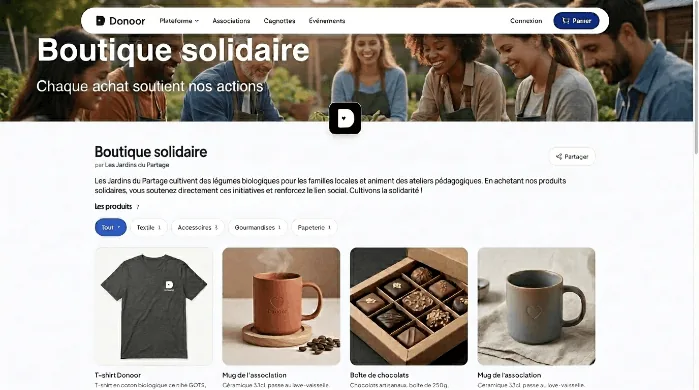

Sell online to fund your organisation
A complete shop designed around how an organisation really works: variants, basket, order statuses and pop-up shops, with no subscription and no platform commission. Payments are secured by Stripe or PayPal and paid directly to your organisation.
Open my shop

Variants with stock
Define size and colour options: each combination has its own stock, updated in real time. No more free-text fields to re-enter by hand.
Discover
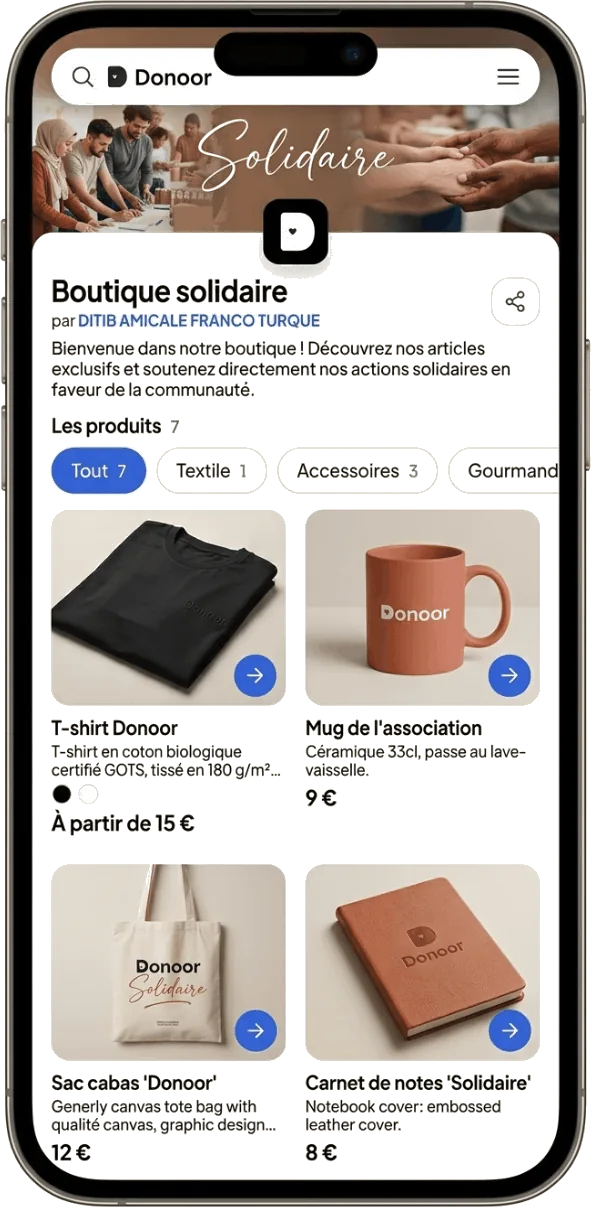
Multi-product basket
The buyer adds several items, then enters their details just once for the entire order, not once per item purchased.
Discover

Order tracking
To process, being prepared, handed over or shipped: you change the status in one click and the buyer automatically receives an email, with the tracking number included.
Discover

Pop-up shop
Open sales for a set period for your seasonal activities: Christmas chocolates, calendars, Christmas trees. Outside this period, the storefront remains visible.
DiscoverEvery size has its own stock, not a text field
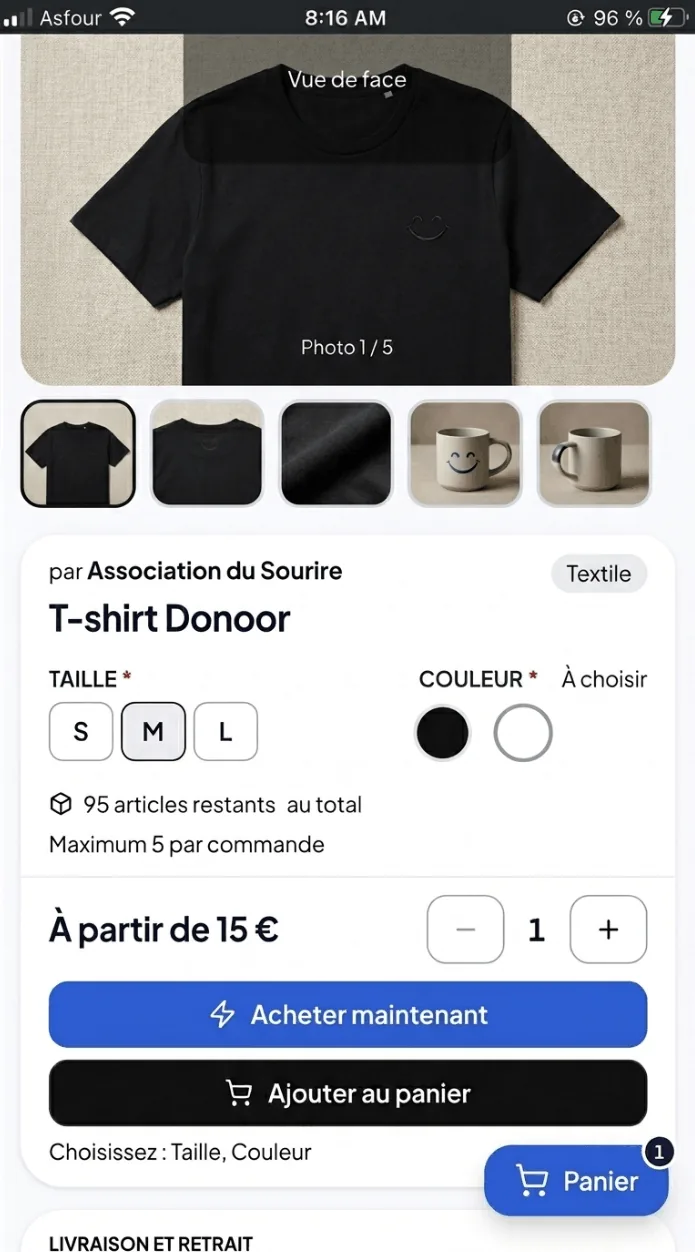
Define your product's options — Size, Colour, Scent — and Donoor creates each combination with its own stock, a price adjusted if needed, and its own reference. The buyer chooses from a clear selector, and you get a list that is already usable for your supplier order.
Stock per combination
Black size M may be sold out while white size L is still available
Remaining stock in real time
Updated instantly for the buyer, without reloading the page
Low stock alert
An email alerts you when a variant drops below the threshold you have set
From payment to handover, without a separate spreadsheet
Each order has a number, the buyer, the line details and the chosen variants. You offer collection on site, delivery or both, each with its own price; the structured address is only requested if the buyer chooses shipping.
Status in one click
To process, being prepared, handed over or shipped: the buyer is notified by email
Usable CSV export
Addresses and custom fields in clean columns, ready for labels
Promo codes
In euros or as a percentage, limited to certain products, a date or a number of uses
You set your collection and shipping options with their price, and can waive fees above a basket amount. The shop does not buy postage on your behalf and does not calculate weight-based rates: you remain in control of your carrier.
What associations sell
An association's shop is rarely about commerce: it is used to fund a project, equip a team or replace paper order forms for a seasonal operation.
 1
1Chocolates and Christmas calendars
The year-end operation without the paper order form folder: each family orders and pays online, and you receive the consolidated list per product.
 2
2T-shirts and club jerseys
The typical case for variants: each size has its own stock, the member chooses theirs when ordering, and you know exactly how many to order from the supplier.
 3
3Village fair and jumble sale
Sell places, raffle tickets or workshop products ahead of the event: less cash to handle on the day, and known takings in advance.
 4
4Craft and solidarity products
Jams, soaps, workshop creations, products from a solidarity project: a permanent showcase reflecting your association, open all year round.
How it works
From opening the shop to handing over orders, in four steps. No technical skills, no website required.

Open your shop
Give it a name, a description and your colours. Choose whether it is permanent or limited to a sales period.

Add your products
Photos, description, fixed or free price, and variants if the product has them. Enter the stock for each combination.

Share the link
By email, WhatsApp or on your social networks. You can also embed the shop directly into the pages of your website.
Process orders
Track sales in your dashboard, change the status of each order and export the list to prepare parcels or collections.
Compare shops for organisations
Almost all association platforms offer a sales module. They differ mainly in how they handle variants and order tracking. Here are the functional differences, as documented by each publisher.
| Donoor | HelloAsso | AssoConnect | |
|---|---|---|---|
| Size × colour variants with stock per combination | Declared axes, stock and price per combination | Options and free-text fields, requested again for each item | Partial |
| Buyer details | Entered once for the whole order | Fields attached to the product, not to the buyer | Attached to the account |
| Order processing statuses | To process, being prepared, handed over or shipped, with automatic email | No statuses: tracking via spreadsheet export | To ship, shipped, delivered |
| Collection and delivery | Priced options chosen by the buyer, fees waived above an amount, collection QR code | No module: postage simulated by a dedicated product, address in text fields | Priced options, conditional fees |
| Order refund | Full, per item, or free amount, with stock restored | Whole order only | Full or partial |
| Photos per product | Multiple photos, gallery on the product page | One photo | Multiple photos |
| Editing a product already on sale | Possible: orders keep a snapshot | Not permitted | Possible |
| Cost for the organisation | €0 subscription, 0% platform commission | €0 subscription, funded by the payer's tip | Paid annual subscription |
Comparison based on each publisher's public documentation, up to date as of August 2026. Features change: check with each platform before choosing. For a broader view beyond the shop alone, see our platform comparisons.
Purchase, donation and tax receipt: what you need to know
A shop purchase does not qualify for a tax receipt: the buyer receives something in return, which rules out the tax reduction under article 200 of the CGI. Only a donation without any counterpart qualifies.
That is why Donoor separates the two amounts at checkout: if the buyer adds a donation to their order, that part is treated as a genuine donation and generates a tax receipt if your organisation is eligible and has activated the service.
The sale of goods by an organisation is regulated: thresholds for incidental commercial activities, VAT, and mandatory terms of sale, since the selling organisation is considered a professional. Donoor lets you upload your terms of sale and make their acceptance compulsory at payment. This information is provided for educational purposes only and does not constitute tax advice: please consult your chartered accountant.
To learn everything about tax-deductible donations, see the tax receipts page.
Frequently asked questions
How do I set up an online shop for my organisation?
Create your Donoor account, open a shop from your dashboard, add your products with their photos, prices and variants (size, colour), then publish. Your shop has its own web address, which you can share by email, WhatsApp or on your social media, or embed directly in your website. No technical skills are needed, and going live takes just a few minutes.
Is the Donoor shop really free?
Yes. No subscription and no platform commission on your sales. Only the payment provider's fees apply (Stripe or PayPal), which are the same whatever platform you use. If they wish, buyers can add a voluntary contribution to Donoor when paying: this is what funds the service, and it never reduces what your organisation receives.
Can we sell products in several sizes or colours?
Yes. You define the variant axes for each product (for example Size and Colour), and Donoor automatically generates each combination with its own stock, its own price if needed and its own reference. The buyer picks their size from a selector, the remaining stock updates in real time, and you don't have to re-enter free-text fields by hand afterwards.
Where does the money from sales go?
Directly into your organisation's bank account, via Stripe or PayPal. Donoor never holds your funds: there is no intermediary account, no blocked fundraising balance and no payout delay set by the platform. Payouts are automatic.
Does a shop purchase qualify for a tax receipt?
No. A purchase is a exchange: the buyer receives goods in return for their payment, which rules out the tax reduction provided for under article 200 of the CGI (French General Tax Code). However, if a buyer adds a donation when paying, that part is a genuine donation with nothing in return: it qualifies for a tax receipt if your organisation is eligible and has activated the service. Donoor automatically separates the two amounts.
How do I manage orders once sales have closed?
Each order appears on your dashboard with its number, the buyer, the line details, the selected variants and the address if you requested one. You move an order from “to process” to “being prepared” and then to “handed over or shipped” in one click, adding a tracking number if needed: the buyer automatically receives an email at each stage. You can also export everything as a CSV file, with addresses and custom fields in clean columns.
How do collection and delivery work?
You set up your fulfilment options: collection on site with its address and opening hours, shipping at your chosen rate, or both, at the buyer's choice. You can offer free shipping above a certain basket amount. A postal address is only requested if the buyer chooses shipping; for a collection, they receive a QR code to show on site, which you scan from your dashboard to mark the order as handed over. The shop does not buy postage on your behalf, nor does it calculate weight-based rates: you choose your carrier freely.
Can we open a shop just for a seasonal sale?
Yes, that is the principle of the pop-up shop: you set an opening date and a closing date for sales. Outside this period, the storefront remains visible but ordering is closed. It suits sales of Christmas chocolates, calendars, Christmas trees or fairground events. An organisation can run several shops in parallel, for example a permanent shop and a seasonal one.
Is an organisation allowed to sell products?
An association under the French 1901 Act may sell goods provided the proceeds serve its purpose and are not distributed to its members. Tax thresholds govern ancillary commercial activities and VAT liability, and an organisation that sells is considered a professional within the meaning of the French Consumer Code, which means it must have terms and conditions of sale. Donoor lets you upload your terms and conditions of sale and makes their acceptance mandatory at checkout. For your specific situation, please consult your chartered accountant: we do not provide tax advice.
We take care ofsetting it all up for you.
Create your organization space in a few minutes, or let us set everything up for you. Free, fast, hassle-free.
100% free · No subscription, no commitment
Also discover
Other ways to fund and manage your organisation

Online ticketing
Sell tickets for your events and scan them at the entrance.

Online fundraiser
Fund a project with a goal and a progress gauge.

Memberships and fees
Collect membership fees and manage your member list.
Organisation software
All Donoor features in a single platform.

Free platform
€0 subscription, 0% platform commission.

Fundraising ideas
Summer fair, raffle, car boot sale: formats that work.