Webhooks
Connecting your tools with webhooks
The course for connecting Donoor to your own tools, with or without a developer, and following every message sent.
- 5 modules · 9 min
- 1 practical guide to download
- 13 articles to go further
Introduction
Course content
Automatically send every donation, membership, ticket or order to your CRM, your accounting or your advertising tools. Finally measure your Google Ads and Meta campaigns, donation by donation.
- Create a webhook address and choose the events to receive
- Test delivery, read the log and resend a message
- Find the advertising source of every donation to measure your campaigns
Module 1
Creating your first webhook
Give Donoor your tool's address: every time an event happens, the tool will receive a signed message there.
Module content · 2 min
- What a webhook is and what it is for
- Preparing a receiving address (to try it out: webhook.site)
- Choosing the events, grouped by category
- Copying the signing secret
See the step-by-step guide (5 steps)
- 1
Prepare the receiving address
This is the https address of your server, your CRM or a Make or Zapier scenario. To try it out without installing anything, open webhook.site: a free address appears, copy it.
- 2
Open the settings
In the dashboard, click your organisation's name at the bottom left, then Settings and the Webhooks tab.
- 3
Add the address
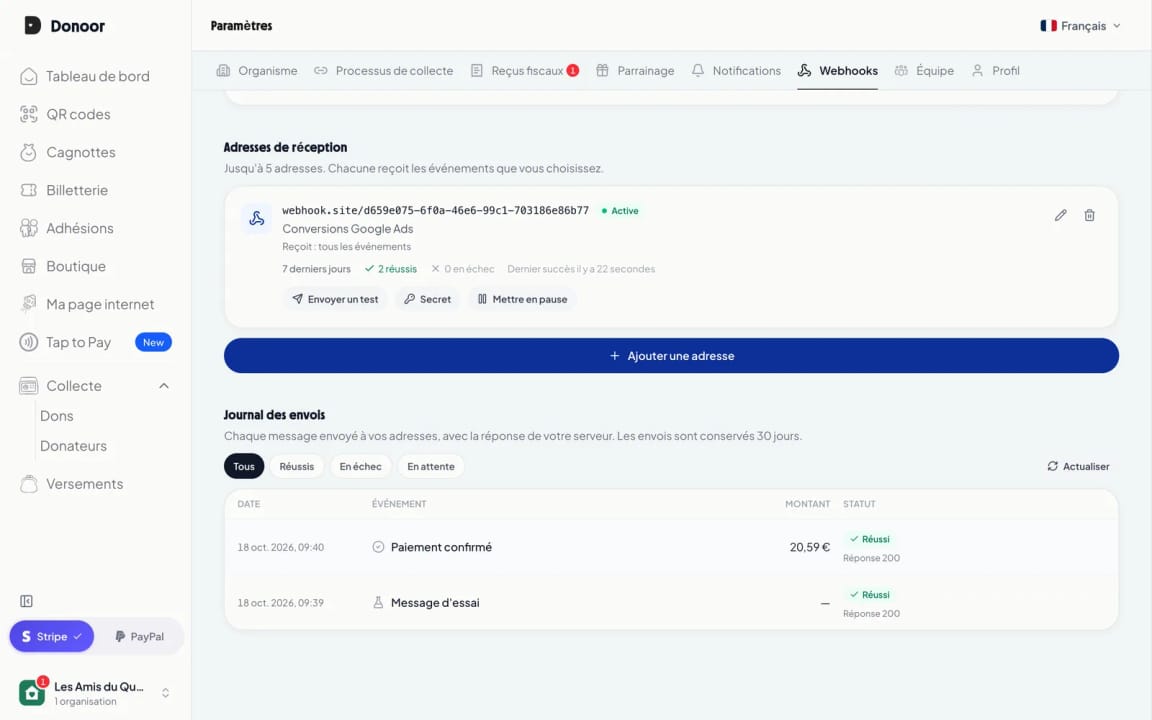
Click Add an address, paste the address and give it a description that makes sense to you, for example “Google Ads conversions”.
- 4
Choose the events
Events are grouped by category: payments, monthly donations, orders, members and tickets, tax receipts, payouts… If in doubt, leave everything ticked, then click Add.
- 5
Copy the secret
A window displays the signing secret (it starts with whsec_). Click Copy and pass it on to your technical team: it proves that the messages really come from Donoor. You can display it again at any time.
Tip
Only the organisation's owner and administrators can manage webhooks, and the owner receives an email whenever an address is added or changed: nobody can quietly divert your data.
Module 2
Testing, simulating and tracking deliveries
Check in one click that your tool receives the messages, simulate any event without a real payment, then track every delivery in the log.
Module content · 2 min
- Sending a test message
- Simulate any of the 28 events
- Reading the delivery log
- Opening a delivery: your server's response and the exact message
- Seeing the message arrive on the server side
Content you may find useful
See the step-by-step guide (5 steps)
- 1
Send a test message
On your address's card, click Send a test. A test message goes out immediately, signed just like the real ones.
- 2
Simulate a real event
Click Simulate an event: choose, for example, “Payment confirmed” or “Ticket scanned”. A preview shows the message, then Donoor sends it with dummy data (livemode false), without any real payment. For your development server, add an endpoint and tick Test endpoint: it only receives these simulations.
- 3
Look at the log
Further down, the Delivery log lists every message from the last 30 days, with its status: delivered, failed or pending. Filter with the buttons above the list.
- 4
Open a delivery
Click a row: you see your server's response (code 200 if all is well), each attempt with its time, and the exact message sent, which you can copy if needed.
- 5
Check on the server side
In your tool (or on webhook.site), the message has arrived with the Donoor-Signature header: this is what your technical team checks.
Module 3
Tracking where each donation comes from
Know which ad brought in each donor: the donation message contains your ad's parameters.
Module content · 2 min
- Adding tracking parameters to your links (utm, gclid…)
- What a donation message contains
- Sending the conversion to Google Ads, GA4 or Meta
- Finding each donation in the log
See the step-by-step guide (4 steps)
- 1
Add your tracking parameters
In your ads, add the usual parameters to your Donoor link: utm_source, utm_campaign… Google Ads adds the gclid itself if auto-tagging is switched on. The parameters are kept until payment, even if the donor switches tabs.
- 2
The donor makes their donation
Nothing changes for them: the donation page is the same. It also works with the widget embedded on your website.
- 3
The message arrives
Less than two minutes after the payment, your tool receives payment.succeeded: amount, donor, conversion ID and, in attribution, the parameters of the original ad.
- 4
Send the conversion
Your server, or a Make or Zapier scenario, sends the conversion to Google Ads, GA4 or Meta with the amount and the conversion ID. Your campaigns are measured donation by donation, even when the browser blocks cookies.
Tip
The message also tells you whether the donor accepted advertising cookies (marketing_consent): respect that choice before sending their data to Google or Meta.
Module 4
Managing your webhooks day to day
Edit your addresses, pause them, change the secret, and know what to do when your server stops responding.
Module content · 2 min
- Choosing exactly which events an address receives
- Pausing and reactivating
- Changing the secret without interrupting anything
- Server outage: automatic retries and resending
Content you may find useful
See the step-by-step guide (5 steps)
- 1
Edit an address
The pencil opens the address window: change its description or its events. The Select all and Deselect all buttons work category by category.
- 2
Pause it
Pause stops deliveries to this address, for example during maintenance. Reactivate starts them again.
- 3
Change the secret if needed
Click Secret, then Change the secret. The old one remains valid for 24 hours, giving your team time to install the new one.
- 4
If your server does not respond
Donoor automatically retries 8 times over about 28 hours; the log shows the time of the next attempt. After the last one, you are notified by email. An address that keeps failing for 3 days is paused automatically.
- 5
Resend a message
Once your server is fixed, open the delivery in the log and click Resend: the same message goes out again immediately.
Module 5
Your technical team's guide
Everything the person connecting your server needs: message format, signature, retries and test environment.
Module content · 1 min
- The 28 events and the content of each message
- Verifying the signature, with ready-to-copy code in Node.js, PHP and Python
- Responding, retries, duplicates and limits
- The sandbox.donoor.org test environment
See the step-by-step guide (3 steps)
- 1
Share the documentation
Send your technical team the link to the webhooks Technical documentation: it describes every event and every field.
- 2
Verify every message
The server verifies the Donoor-Signature header with the secret, then responds with a 200 code in under 10 seconds. A worked example lets you test the code.
- 3
Test without risk
On sandbox.donoor.org, a separate test environment that search engines do not index, create an organisation and connect Stripe in test mode (dummy information is enough). Your test payment page goes live straight away: make dummy donations on it with the card 4242 4242 4242 4242 and receive real messages, marked livemode false.
Questions? We have answers
Do I need a developer to use webhooks?
Not necessarily. With Make or Zapier, you paste the address of their “Custom webhook” module into Donoor, then connect the messages to Google Sheets, your CRM or Google Ads without writing any code. For an in-house server, you need someone who knows how to verify the signature: the technical documentation provides ready-to-copy code.
How can I test without making real payments?
From your own account: the Simulate an event button sends any of the 28 events with dummy data, and a test endpoint only receives these simulations. Nothing to install, no new sign-up.
Do webhooks cost anything?
No: they are free and open to all organisations, like the rest of Donoor.
Will I receive past donations?
No: only events that happen after you add your first address are sent. For your history, use the dashboard exports.
Is my donors' data protected?
Messages are only sent to https addresses, signed with a secret unique to each address. Only the owner and administrators can configure webhooks, and the owner is notified by email whenever an address changes.
What happens if my server is down?
Nothing is lost: Donoor retries for about 28 hours, then notifies you by email. Each message stays in the log for 30 days and can be resent in one click.
Got a question? Let's talk.
30 minutes on a video call to discover Donoor, ask your questions and set up your organisation together.
Free, no commitment